

Give Your Business a Dedicated Identity
For many small businesses, communication begins with a personal mobile number. It is convenient, familiar, and requires no complicated setup. However, as the business grows, using the same number for friends, family, customers, suppliers, and work enquiries can quickly become difficult to manage. Important calls can be missed, messages can become mixed together, and customers may not always receive the professional experience they expect.
A dedicated business number creates a clearer boundary. Grasshopper is designed around virtual business phone systems that allow entrepreneurs to separate business calls, messages, and contacts from personal communication while continuing to use existing devices. The platform offers local, toll-free, and vanity numbers, as well as the option to port an existing business number.
This can be particularly useful for freelancers, consultants, home-based businesses, agencies, and growing teams. A separate number gives customers a consistent point of contact without requiring the business owner to carry another physical phone. It also creates a more organized foundation for adding other communication features later.
Before choosing a number, think about how customers will encounter your business. A local number may suit a company serving a specific community, while a toll-free number can create a broader business presence. A memorable vanity number can also make a brand easier to recall when an appropriate option is available.
Create a Consistent First Impression
A phone call is often one of the first direct interactions a customer has with a business. Even a great product or service can feel less professional if customers encounter confusion when they call. A consistent greeting, clear voicemail, and straightforward call routing can make the experience much smoother.
Grasshopper allows businesses to customize greetings and voicemail messages, while extensions can be created for employees or departments. Calls can then be forwarded according to the company’s preferred setup.
For a small business, the setup does not need to sound overly corporate. A simple greeting can identify the company, explain what customers should expect, and provide useful instructions when nobody is available. If a business has several departments, extensions can make navigation easier. If there is only one owner, a simple menu may still help separate sales enquiries, existing customers, and general questions.
Consistency matters across every channel. The name customers hear on a call should match the business name they see online. Voicemail wording should be clear and current, and automated responses should avoid promising a response time the business cannot realistically maintain.
A professional communication system is ultimately about reducing uncertainty. Customers should know that they have reached the right business and understand what to do next.
Make Calls Work Around Your Schedule
Small-business owners are rarely sitting beside a desk phone all day. They may work from home in the morning, visit customers in the afternoon, and handle administrative tasks from another location later. A communication system needs to accommodate that flexibility rather than force the business into a fixed workspace.
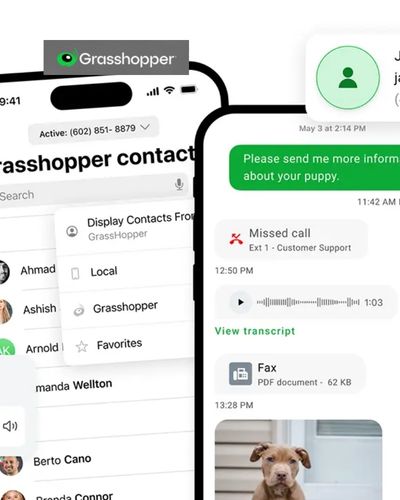
Grasshopper’s virtual phone system works through mobile and desktop applications, allowing users to make and receive business calls without relying on traditional office phone hardware. Incoming calls can also be forwarded to selected numbers or team members.
This flexibility can be useful for entrepreneurs who travel frequently or operate remotely. Instead of publishing a personal mobile number and manually explaining when they are unavailable, they can maintain one business-facing contact point while controlling where calls are received.
Call handling can also become more structured as the company grows. Different extensions can be assigned to team members, departments can have their own routing rules, and multiple users can participate in customer communication. Grasshopper currently promotes shared numbers, extensions, and call-routing capabilities for growing small businesses.
The goal is not simply to answer every call immediately. It is to create a system where important enquiries have a clear path, even when the business owner is busy.
Add Texting to Your Customer Communication
Phone calls are important, but customers increasingly expect businesses to communicate through text as well. A quick message can be useful for confirming appointments, answering simple questions, following up after a call, or providing an update that does not require a conversation.
Grasshopper’s Business Text feature allows businesses to send and receive messages using their dedicated business number rather than a personal number. The company also supports business MMS for local numbers, allowing supported users to exchange picture messages.
Having calls and texts connected to the same business identity can make communication easier for both customers and employees. A customer does not need to wonder whether a message from an unfamiliar personal number is actually from the company. The business can also maintain a more consistent record of conversations.
Texting should still be used thoughtfully. Messages should be concise, relevant, and appropriate for the customer relationship. Avoid sending unnecessary promotional messages simply because texting is available. Instead, focus on situations where a short written response genuinely makes communication faster or clearer.
For service businesses, texting can be particularly practical for appointment confirmations, scheduling updates, and quick customer responses. It can complement phone conversations rather than replace them entirely.
Build a System That Can Grow With Your Team
A communication setup that works for one person may become difficult when several employees start answering customers. Without a clear structure, calls can be duplicated, messages may go unanswered, and nobody may know who is responsible for following up.
Grasshopper supports multiple users, extensions, shared numbers, and call-routing options designed for small teams. Its current plans also emphasize adding users without additional per-user costs, depending on the plan and service terms.
Before adding employees, decide how customer calls should move through the business. You might have a general number that routes callers to sales, support, billing, or another department. A smaller company may instead use one shared number with different extensions for individual team members.
The important thing is to establish responsibilities. If a customer leaves a voicemail, someone should know who reviews it. If a text arrives outside normal hours, there should be a clear process for responding later. If a call is transferred, the receiving employee should understand the context whenever possible.
A scalable communication system is therefore partly about technology and partly about internal processes. The software can provide routing and communication tools, but the business still needs clear rules for using them.
Turn Communication Into a Daily Business Routine
The best phone system is one that becomes part of normal operations rather than another complicated tool employees avoid using. Once the basic setup is complete, create simple habits around calls, texts, voicemails, and follow-ups.
Start each day by checking unanswered calls and messages. During working hours, use the business number consistently rather than switching between personal and business accounts. At the end of the day, review anything that requires a response and make sure important enquiries have been assigned to someone.
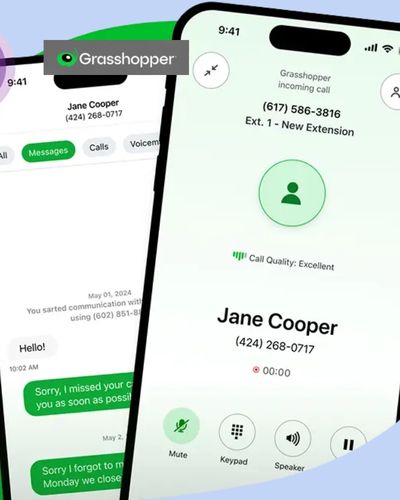
Grasshopper brings calls, texts, and voicemails together through its communication tools, while its desktop and mobile apps allow users to stay connected across different work environments. The platform also offers features such as voicemail transcription, call recording, automated responses, and call forwarding, depending on the selected service and configuration.
Regularly review your setup as the company changes. You may need a new extension, an additional number, different call-routing rules, or updated greetings. Keeping these details current prevents customers from encountering outdated information.
A professional communication system does not have to be complicated or expensive to maintain. The right combination of a dedicated number, clear greetings, reliable call handling, business texting, and organized team access can make a noticeable difference to everyday operations. Grasshopper gives small businesses a way to build that structure around the devices they already use, allowing communication to remain professional while the business continues to move, adapt, and grow.